Your Quick Guide to an AI Marketing Dashboard That Works
Struggling to see what really moves the needle? An ai marketing dashboard can feel like magic. It pulls in data, crunches numbers and shows you what’s working—from brand mentions on AI chatbots right through to social media buzz. In two steps, you get clear insights. In ten steps, you’ve got a road map for growth.
In this guide we’ll compare a popular platform’s approach with our own AI Visibility Tracking for Small Businesses. You’ll learn why generic dashboards fall short, and how a purpose-built ai marketing dashboard brings everything together, saving time and money. Ready to track every AI-driven mention? Get started with our ai marketing dashboard and boost your visibility
Why Traditional Dashboards Fall Short
Most small businesses rely on off-the-shelf tools. They track website analytics, email stats or social media engagements. Yet they miss one thing: how AI describes your brand. A well-known competitor offers sleek visuals and basic campaign stats, but it won’t tell you what ChatGPT or Bing’s AI assistant says about you.
- Strength: They tie into your ad spend and ROI.
- Weakness: No generative engine insights.
- Outcome: You see surface metrics but lack context on AI-generated narratives.
With our AI Visibility Tracking for Small Businesses, you fill that gap. Now you can see:
* AI-based brand mentions in generative answers.
* Competitor comparisons inside AI platforms.
* The tone AI uses when talking about your offerings.
Want the full picture? Learn how AI visibility works
Step-by-Step Guide to Building Your AI Marketing Dashboard
Follow these steps to bring everything under one roof.
1. Define Objectives and KPIs
First, get clear on what you want to track. Do you care about:
* Brand mentions in AI chat logs?
* Share of voice against competitors in generative results?
* How often your product appears in AI-powered summaries?
Write down the top three metrics. Everything else flows from here.
2. Choose Your AI Visibility Tracking Tool
Not all tools are equal. You need a platform built for small teams, not a complex enterprise suite. Look for:
* Simple setup—no coding required.
* AI-focused metrics, not just SEO or web analytics.
* Alerts when new mentions pop up in AI responses.
This is where our AI Visibility Tracking for Small Businesses shines. It was built to be:
* Affordable for SMEs.
* Open-source, so you can tweak it.
* Community-driven, with regular updates.
3. Integrate Your Data Sources
Pull in data from everywhere:
* Website analytics (Google Analytics or similar).
* Social media APIs.
* AI chat transcripts (ChatGPT, Claude, Bard).
Combine them in one dashboard. This gives you a single view of performance. And if you want to dive into local search or geopatterns, don’t forget to factor in geographic SEO data. Explore practical GEO SEO strategies to see how local insights help your AI rankings.
4. Design a User-Friendly Interface
Keep it simple:
* Clean layout.
* Clear labels.
* Colour-coded alerts.
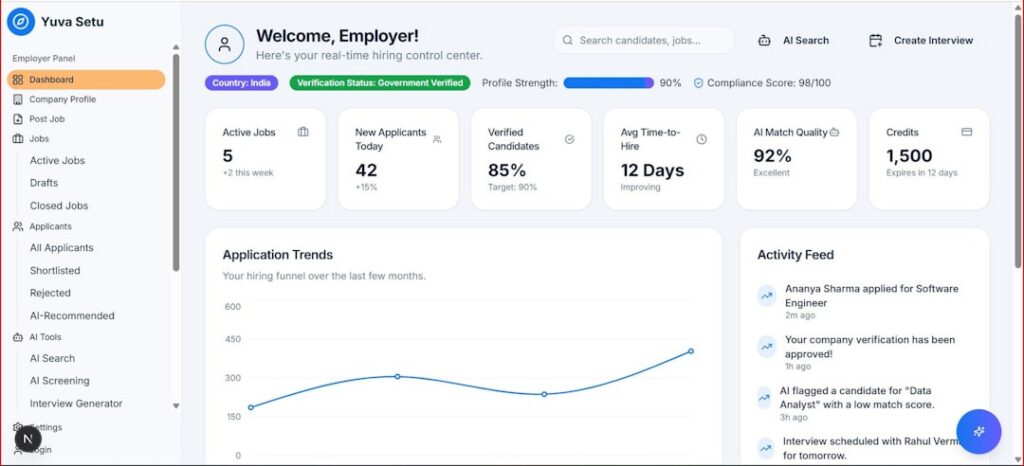
Show key metrics at the top. Deeper data can live in tabs. Use charts and graphs that tell a story, not just lists of numbers.
5. Configure Alerts and Automations
Set up notifications for critical events:
* When your brand mention in an AI response spikes by 50%.
* If a competitor overtakes you in share-of-voice.
* When new AI platforms add your business to their knowledge base.
Automate weekly summary emails. That way, everyone stays informed without logging in.
6. Test, Gather Feedback and Iterate
No dashboard is perfect on day one. Share it with your team. Ask for feedback on:
* Which charts help them make decisions.
* What’s confusing or missing.
* How often they need updates.
Refine the dashboard over time. Think of it as a living project, not a one-off setup.
By the way, if you’re tackling SEO and geo efforts at scale, you might want to see how you can run AI SEO and GEO on autopilot for your business. It’s a popular way to keep your content recommendations fresh.
Now you’ve covered half the journey. Let’s look at best practices.
Experience our ai marketing dashboard in action
Best Practices for Small Businesses
Even a great dashboard needs care. Here are tips to make it sing:
- Tell a story. Frame your metrics so every graph has a narrative.
- Focus on the audience. Customise views for marketing, leadership or ops.
- Visualise data. Use pie charts for share-of-voice, line graphs for trends.
- Review weekly. A short 15-minute run-through keeps everyone aligned.
- Archive old data. Keep your dashboard lean.
And remember, consistency beats complexity. One well-maintained dashboard trumps ten half-built ones.
Want to learn how AI assistants pick your site? Understand how AI assistants choose which websites to recommend
Testimonials
“Since we switched to this AI Visibility Tracking tool, we catch every brand mention AI-wide. No more surprises. Data is at our fingertips.”
— Laura M., Boutique Retailer
“This dashboard gave us insights we never had. We saw our product pop up in chat responses for the first time. That was a game-changer for demos.”
— Mark T., SaaS Founder
“As a one-person marketing team, I needed something simple yet powerful. This tool delivered. I save hours every week.”
— Priya S., Freelance Consultant
Conclusion
Building an ai marketing dashboard doesn’t have to be a drain on time or budget. Start by defining clear KPIs, choose a tool built for AI visibility, integrate your data sources and design an interface that tells a story. Then automate alerts and iterate.
Compared with generic platforms, our AI Visibility Tracking for Small Businesses goes deeper into generative responses and brand perception across AI assistants. You get exactly what you need—nothing extra, nothing missing.
Ready to see it in action? Try the ai marketing dashboard designed for small businesses now
Share
Related posts